You do not have to rip out GoHighLevel to escape the AI Employee add-on. You have to decide which layer to replace.
AI Employee is really four products bundled together: Conversation AI, Voice AI, Reviews AI, and Content AI, for $97/month per sub-account. We build on both sides of the fence, native Voice AI and an external Vapi or Retell agent wired into GHL, so we can tell you which layer is actually worth swapping instead of selling you a rip-and-replace.
$97/mo
AI Employee Unlimited, per enabled sub-account (HighLevel AI Product Pricing)
7
native Voice AI post-call actions, the only levers before you push into a workflow
$497/mo
the Agency Pro tier you need before you can rebill AI Employee with markup



One inbound call on native GHL Voice AI, from the assigned LC Phone number to the post-call write-back, the build we ship.
Caller dials the assigned number
LC Phone or a connected Twilio number
Voice AI answers and reasons
STT to LLM to TTS, GPT-5 Mini under the hood
Reads the calendar, offers slots, books
Live availability, intent-based selection across calendars
Fires a post-call action
Trigger a Workflow, the bridge to real logic
Workflow writes back to the contact
Tags, fields, and follow-up SMS, if the triggers match
The Problem
Why agencies go looking past the native AI Employee
You cannot mark it up until you are on the $497/month Agency Pro or SaaS Pro plan. On lower tiers you can run AI Employee, but you cannot rebill its usage to sub-accounts through the wallet, so there is no clean way to charge a client with margin. That single fact drives most of the search for an alternative.
The $97 plan flattens AI compute, not telephony. LC Phone and Twilio minutes are billed separately from AI Employee, so a flat retainer quietly eats the overage the month a client's call volume spikes.
A Voice AI agent has exactly seven native post-call levers: Call Transfer, Trigger a Workflow, Send SMS, Update Contact Field, Appointment Booking, Custom Action, and Add MCP (Beta). Anything past that has to be pushed into a GHL workflow, and it silently no-ops when the workflow's trigger filters do not match the contact the agent just updated.
Native Voice AI vs an external agent wired into GHL
HighLevel Support Portal, AI Product Pricing article (help.gohighlevel.com/support/solutions/articles/155000006652)
What You've Already Tried
What running native Voice AI actually looks like
You build the agent under AI Agents, Voice AI, Create Agent, and configure it across three tabs: Agent Details for voice, timezone and LLM, Settings for the Knowledge Base and post-call trigger, and Phone and Availability for the numbers and working hours.
The agent is only as smart as the attached Knowledge Base. Load a thin one and it will confidently invent hours, pricing, or policy on a recorded call, because there is no escalation trigger for out-of-scope questions unless you wire one.
Booking works well now, live calendar reads and intent-based selection across multiple calendars, but scope the calendars per agent or it double-books when a sub-account has several.
White-labeling the AI layer for a client, by build path
Every ranking page picks a camp. Nobody maps the middle
0 pages
neutrally map keep GHL, swap only the AI layer
Search this and you get two kinds of page. Broad GoHighLevel alternatives listicles that tell you to replace the whole CRM with HubSpot or ActiveCampaign and never mention the AI Employee add-on at all, and single-vendor pages pitching their own product. Neither one neutrally maps the decision most agencies actually face: keep GoHighLevel, replace only the AI layer. Almost none of them even show the native build, the three-tab Voice AI setup or the seven real post-call actions, so a buyer cannot tell what they would lose by leaving.
Competitive SERP review · 2026
What We Build
How we make the call on your build

Keep it native
Voice AI on GHL is genuinely good now at the core jobs: reading the assigned calendar live, offering and confirming slots, intent-based selection so one agent books across multiple calendars, and answering from a Knowledge Base across SMS, the chat widget, Messenger, Instagram, and WhatsApp. When that is the job, leaving native only adds cost and a connector.
Swap the layer
When you need behavior past the seven native actions, we run an external agent. Retell typically connects through a Marketplace connector, Vapi exposes official GHL calendar tools configured on the Vapi side, and booking and contact updates flow back through GHL workflows or the API. It is more capable and it breaks in a specific way: when the connector or a mapped custom field changes, bookings stop writing back with no obvious error.
Run the layer
Whichever path, the failure modes are operational, not one-time. We load a real Q and A Knowledge Base with an explicit out-of-scope escalation trigger, scope calendars per agent and test booking with live calls before go-live, tie Call Transfer to the same after-hours and high-intent conditions so urgent callers reach a human, and meter carrier minutes so the client is not surprised.
What it looks like
Inside the build: the real tools behind GoHighLevel AI Employee Alternative

AI voice agents handle live calls, qualify leads, and book appointments for you.
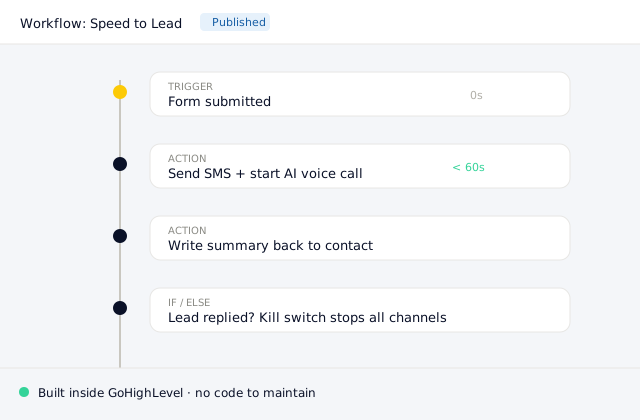
The GoHighLevel workflow wiring the AI employee into your existing pipeline.
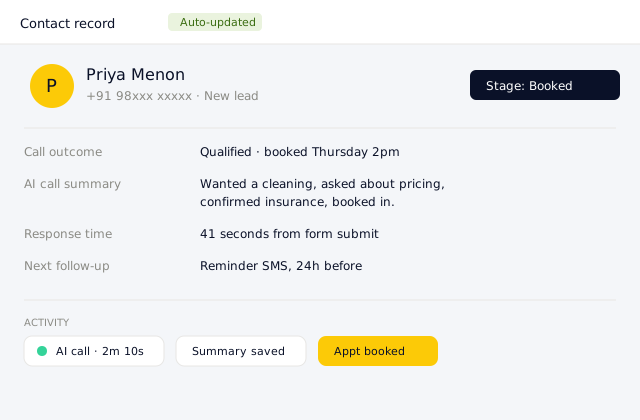
Every interaction logged back to the contact record automatically.
The Process
From first call to live. One week.
We handle the prompts, the telephony, and the integrations. You just answer the qualified pings.
We audit the real constraints, not the marketing: your agency plan tier and whether you can rebill AI Employee through the wallet, your call volume and carrier-minute exposure, and how many calendars each sub-account runs. That decides native versus an external agent before any building starts.
Your time: One 45-minute call plus access
On native, we configure the three Voice AI tabs, Agent Details, Settings, and Phone and Availability, load a real Knowledge Base, and set the LLM and voice. On an external build, we stand up the Vapi or Retell agent and its GHL calendar tools or connector. Either way the prompt is written to your offer and objections, not left generic.
Your time: Answer offer and objection questions
We connect the post-call action, usually Trigger a Workflow, and confirm the workflow's trigger filters actually match the contact the agent updates, so follow-up does not silently no-op. We scope calendars per agent to stop double-booking and tie Call Transfer to your after-hours and high-intent conditions, then place real test calls and book into a live calendar.
Your time: Review a few recorded test calls
We set up metering for LC Phone or Twilio minutes and AI compute so the monthly number is not a surprise, confirm rebilling is configured if you are on Agency Pro, then go live and watch the first real calls. Prompt and Knowledge Base gaps get fixed against actual transcripts.
Your time: Approve go-live
Results
The facts that actually decide native versus a swap
$97/mo
AI Employee Unlimited, per enabled sub-account (HighLevel AI Product Pricing)
AI Employee Unlimited is $97/month per enabled sub-account for unlimited Conversation AI, Voice AI, Reviews AI, and Content AI, plus 3x included usage for Ask AI and AI Studio.
7
native Voice AI post-call actions, the only levers before you push into a workflow
A Voice AI agent's only native post-call actions are Call Transfer, Trigger a Workflow, Send SMS, Update Contact Field, Appointment Booking, Custom Action, and Add MCP (Beta). Everything else lives in a GHL workflow.
$497/mo
the Agency Pro tier you need before you can rebill AI Employee with markup
Rebilling AI Employee usage to sub-accounts with markup requires the Agency Pro or SaaS Pro plan at $497/month. That is the single biggest constraint on productizing GHL AI as an agency.
FAQ
Questions we get asked.
$497/mo
the Agency Pro tier that decides whether you can productize GHL AI with markup
Stop losing revenue to
an unanswered phone.
We will check your plan tier and call volume, show you the native three-tab Voice AI build and an external agent side by side, and tell you honestly which layer is worth replacing for your case.
Or email aditya@tryagentikai.com